
CHARACTER IMPORTER TOOL
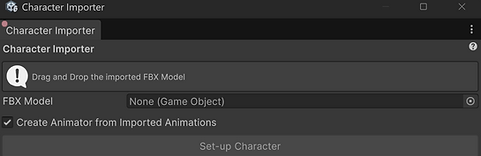
Character Importer Tools are something that I have made in almost every studio, catering to the Project's specific needs. The goal of a Tool like this is to allow for the implementation of a 3D model. This ensures that all proper settings are applied to the Model itself, a Prefab is created from the Model, all required components are applied to the Prefab, and that the Prefab is applied to proper Addressable groups, with proper settings. Tools like this also sometimes change the names of the Prefab upon creation, or move the location in the Project of these source Assets. As a further automation I also have functionality to create Animator Controllers after extracting the imported Animations from the FBX, to avoid the need for two steps when setting up a Model.
ANIMATOR SET-UP TOOL

Animator Set-up Tools are are needed on almost every Project I have worked on. The goal of these Tools are to allow for a complex Animator Controller to be created, without the need for manual work. In most cases there are two flows, one where you need to create the Clips and Animate them later, or one where the Clips come from a 3D Model. In both cases the Controller would be made, the number of Clips quieried and applied into the Controller, transitions and settings like "Loop" would be applied, and the Controller would be applied to the user defined Prefab.
ASSET VALIDATION

Asset Validation Tools are often required on every Project. Depending on the Project's performance goals, tools like this can be used to check certain Asset types, so that modifying settings for bext practices is easier. Many times, using tools like the above is just a verification step, to ensure no settings that are unperformant are missed. Many times these tools have options to check specific locations in the Project, or to Validate the whole project. Often, these tools work in conjunction with a tool that would correct the found unperformant settings as well.